MazeProgrammingController Class Reference
[Maze minigame]
#include <MazeProgrammingController.h>
Inherits GameController.
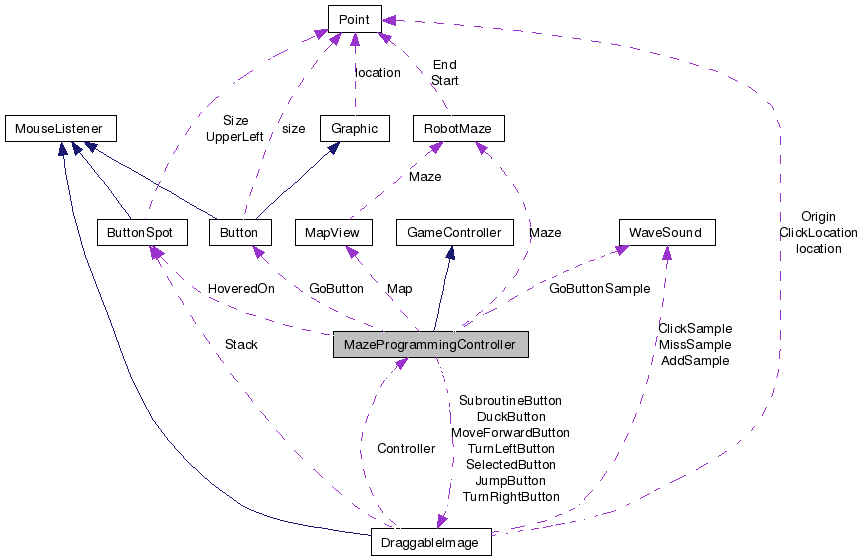
Public Member Functions | |
| MazeProgrammingController (RobotMaze *maze, list< ButtonSpot * > *commandSpots, list< ButtonSpot * > *subroutineSpots, bool actionCommands, bool subroutineCommands) | |
| MazeProgrammingController (RobotMaze *maze, list< ButtonSpot * > *commandSpots, list< ButtonSpot * > *subroutineSpots, bool actionCommands, bool subroutineCommands, bool retry) | |
| virtual | ~MazeProgrammingController () |
| void | step () |
| This function will be called each time unit of the game. | |
| void | draw (BITMAP *bmp) |
| This function will also be called each screen refresh to draw to the buffer. | |
| bool | writeCommand (Point location, MazeCommand command) |
| This tries writing the command to both the Commmand Sequence and Subroutine, returns true if it is written successfully. | |
| void | setSelectedButton (DraggableImage *button) |
| This sets the button which will be drawn last so a dragged image appears on top of everything. | |
| void | highlightButtonSpot (Point location, MazeCommand command, MouseEvent *e) |
| These functions are used to handle highlighting and unhighlighting the buttons as the mouse moves. | |
| void | unhighlightButtonSpots (MouseEvent *e) |
| bool | isComplete () |
| This function can be called to check if the GameController is done. | |
| void | setComplete () |
Private Member Functions | |
| void | drawMazeProgrammingButtons (BITMAP *bmp) |
| Draw the DraggableImages on the left of the robot. | |
| void | drawMazeCommands (BITMAP *bmp) |
| Draw the ButtonSpots on the right of the robot where the commands are dropped in. | |
| void | drawMazeSubroutine (BITMAP *bmp) |
| Draw the ButtonSpots for the subroutine area. | |
| bool | insertCommand (list< ButtonSpot * > *buttonSpots, MazeCommand command, list< ButtonSpot * >::iterator it) |
| Insert a command instead of overwrite it, return true if it is inserted successfully. | |
| bool | writeCommand (Point location, MazeCommand command, list< ButtonSpot * > *spots) |
| Try writing a command to a specific list of ButtonSpots, return true if it is put in the list. | |
| ButtonSpot * | isOnButtonSpot (Point location, list< ButtonSpot * > *spots) |
Private Attributes | |
| list< ButtonSpot * > * | CommandSpots |
| The spots where the DraggableImages can be dropped into. | |
| list< ButtonSpot * > * | SubroutineSpots |
| ButtonSpot * | HoveredOn |
| This keeps track of the ButtonSpot in the instructions area for highlighting purposes. | |
| RobotMaze * | Maze |
| This contains the information about the maze (not the robot). | |
| DraggableImage * | MoveForwardButton |
| DraggableImage * | TurnRightButton |
| DraggableImage * | TurnLeftButton |
| DraggableImage * | JumpButton |
| DraggableImage * | DuckButton |
| DraggableImage * | SelectedButton |
| DraggableImage * | SubroutineButton |
| Button * | GoButton |
| The roll over button that takes the player to the MazeRunController. | |
| MapView * | Map |
| The map in the robot's head that draws itself. | |
| bool | complete |
| bool | ActionCommands |
| bool | SubroutineCommands |
| bool | retry |
| WaveSound * | GoButtonSample |
Constructor & Destructor Documentation
| MazeProgrammingController::MazeProgrammingController | ( | RobotMaze * | maze, | |
| list< ButtonSpot * > * | commandSpots, | |||
| list< ButtonSpot * > * | subroutineSpots, | |||
| bool | actionCommands, | |||
| bool | subroutineCommands | |||
| ) |
| MazeProgrammingController::MazeProgrammingController | ( | RobotMaze * | maze, | |
| list< ButtonSpot * > * | commandSpots, | |||
| list< ButtonSpot * > * | subroutineSpots, | |||
| bool | actionCommands, | |||
| bool | subroutineCommands, | |||
| bool | retry | |||
| ) |
| MazeProgrammingController::~MazeProgrammingController | ( | ) | [virtual] |
Member Function Documentation
| void MazeProgrammingController::draw | ( | BITMAP * | ) | [virtual] |
This function will also be called each screen refresh to draw to the buffer.
Implements GameController.
| void MazeProgrammingController::drawMazeCommands | ( | BITMAP * | bmp | ) | [private] |
Draw the ButtonSpots on the right of the robot where the commands are dropped in.
| void MazeProgrammingController::drawMazeProgrammingButtons | ( | BITMAP * | bmp | ) | [private] |
Draw the DraggableImages on the left of the robot.
| void MazeProgrammingController::drawMazeSubroutine | ( | BITMAP * | bmp | ) | [private] |
Draw the ButtonSpots for the subroutine area.
| void MazeProgrammingController::highlightButtonSpot | ( | Point | location, | |
| MazeCommand | command, | |||
| MouseEvent * | e | |||
| ) |
These functions are used to handle highlighting and unhighlighting the buttons as the mouse moves.
| bool MazeProgrammingController::insertCommand | ( | list< ButtonSpot * > * | buttonSpots, | |
| MazeCommand | command, | |||
| list< ButtonSpot * >::iterator | it | |||
| ) | [private] |
Insert a command instead of overwrite it, return true if it is inserted successfully.
| bool MazeProgrammingController::isComplete | ( | ) | [inline, virtual] |
| ButtonSpot * MazeProgrammingController::isOnButtonSpot | ( | Point | location, | |
| list< ButtonSpot * > * | spots | |||
| ) | [private] |
This goes through the list supplied (Which will be the subroutine or the instructions area) and checks whether any of the buttons contain the location
| void MazeProgrammingController::setComplete | ( | ) | [inline] |
| void MazeProgrammingController::setSelectedButton | ( | DraggableImage * | button | ) | [inline] |
This sets the button which will be drawn last so a dragged image appears on top of everything.
| void MazeProgrammingController::step | ( | ) | [inline, virtual] |
| void MazeProgrammingController::unhighlightButtonSpots | ( | MouseEvent * | e | ) |
| bool MazeProgrammingController::writeCommand | ( | Point | location, | |
| MazeCommand | command | |||
| ) |
This tries writing the command to both the Commmand Sequence and Subroutine, returns true if it is written successfully.
| bool MazeProgrammingController::writeCommand | ( | Point | location, | |
| MazeCommand | command, | |||
| list< ButtonSpot * > * | spots | |||
| ) | [private] |
Try writing a command to a specific list of ButtonSpots, return true if it is put in the list.
Member Data Documentation
bool MazeProgrammingController::ActionCommands [private] |
These are set upon construction and are used to only give the player the commands that are meant to be used for this level.
list<ButtonSpot*>* MazeProgrammingController::CommandSpots [private] |
The spots where the DraggableImages can be dropped into.
bool MazeProgrammingController::complete [private] |
DraggableImage * MazeProgrammingController::DuckButton [private] |
Button* MazeProgrammingController::GoButton [private] |
The roll over button that takes the player to the MazeRunController.
This is the sound for the Go Button
ButtonSpot* MazeProgrammingController::HoveredOn [private] |
This keeps track of the ButtonSpot in the instructions area for highlighting purposes.
DraggableImage * MazeProgrammingController::JumpButton [private] |
MapView* MazeProgrammingController::Map [private] |
The map in the robot's head that draws itself.
RobotMaze* MazeProgrammingController::Maze [private] |
This contains the information about the maze (not the robot).
The buttons that can be clicked and dragged. The SelectedButton is for the button being dragged around and is used to make sure it is drawn on top.
bool MazeProgrammingController::retry [private] |
This determines the message being displayed, and is true if they tried and failed.
bool MazeProgrammingController::SubroutineCommands [private] |
list<ButtonSpot*> * MazeProgrammingController::SubroutineSpots [private] |
The documentation for this class was generated from the following files:
- Comps/LearningGaming/RobotMazeMinigame/MazeProgrammingController.h
- Comps/LearningGaming/RobotMazeMinigame/MazeProgrammingController.cpp