ButtonSpot Class Reference
[Maze minigame]
#include <ButtonSpot.h>
Inherits MouseListener.
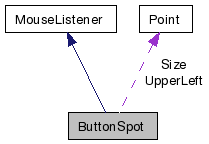
Public Member Functions | |
| ButtonSpot (Point upperLeft, Point size) | |
| ButtonSpot (Point upperLeft, Point size, MazeCommand command) | |
| virtual | ~ButtonSpot () |
| void | setCommand (MazeCommand command) |
| MazeCommand | getCommand () |
| bool | isEmpty () |
| Returns whether this spot contains a command or not. | |
| int | getUpperLeftX () |
| Returns the position information. | |
| int | getUpperLeftY () |
| int | getSizeX () |
| int | getSizeY () |
| bool | containsPoint (Point location) |
| Returns true if the location is within the button spot. | |
| void | draw (BITMAP *bmp) |
| void | activateMouseListener () |
| void | mouseHover (MouseEvent *) |
| Called when a MouseListener is being hovered on by the mouse. | |
| void | mouseExit (MouseEvent *) |
| Called when a MouseListener was being hovered on and is suddenly no longer so. | |
Private Member Functions | |
| void | drawMazeCommandImage (BITMAP *bmp) |
| If the spot is not empty, this method is used to draw. | |
Private Attributes | |
| Point | UpperLeft |
| The upper left corner of the spot and its size in pixels. | |
| Point | Size |
| MazeCommand | Command |
| The command that the button at this spot represents. | |
| bool | Empty |
| If there is no command, this is set to true, otherwise, false. | |
| bool | ActivatedMouseListener |
| This keeps track of whether this spot is a possibility to have commands placed in. | |
| BITMAP * | CurrentImage |
| This keeps track of what is being drawn for the outline of this spot, which will change if it is active and hovered over. | |
Detailed Description
ButtonSpot.hCreated on: Jan 6, 2009 Author: Erik
This class is for the spots where the DraggableImages can be dropped into. They keep track of their location and size so they can check if a released DraggableImage is over them. They also remember any command given to them, or if they are just empty.
Constructor & Destructor Documentation
| ButtonSpot::ButtonSpot | ( | Point | upperLeft, | |
| Point | size, | |||
| MazeCommand | command | |||
| ) |
| ButtonSpot::~ButtonSpot | ( | ) | [virtual] |
Member Function Documentation
| void ButtonSpot::activateMouseListener | ( | ) |
Called if it is a possible spot for commands to be dropped into. So it is called if a spot is filled, or if it is the next open spot.
| bool ButtonSpot::containsPoint | ( | Point | location | ) | [virtual] |
| void ButtonSpot::draw | ( | BITMAP * | bmp | ) |
| void ButtonSpot::drawMazeCommandImage | ( | BITMAP * | bmp | ) | [private] |
If the spot is not empty, this method is used to draw.
| MazeCommand ButtonSpot::getCommand | ( | ) | [inline] |
| int ButtonSpot::getSizeX | ( | ) | [inline] |
| int ButtonSpot::getSizeY | ( | ) | [inline] |
| int ButtonSpot::getUpperLeftX | ( | ) | [inline] |
Returns the position information.
| int ButtonSpot::getUpperLeftY | ( | ) | [inline] |
| bool ButtonSpot::isEmpty | ( | ) | [inline] |
Returns whether this spot contains a command or not.
| void ButtonSpot::mouseExit | ( | MouseEvent * | ) | [virtual] |
Called when a MouseListener was being hovered on and is suddenly no longer so.
Reimplemented from MouseListener.
| void ButtonSpot::mouseHover | ( | MouseEvent * | ) | [virtual] |
| void ButtonSpot::setCommand | ( | MazeCommand | command | ) |
Member Data Documentation
bool ButtonSpot::ActivatedMouseListener [private] |
This keeps track of whether this spot is a possibility to have commands placed in.
MazeCommand ButtonSpot::Command [private] |
The command that the button at this spot represents.
BITMAP* ButtonSpot::CurrentImage [private] |
This keeps track of what is being drawn for the outline of this spot, which will change if it is active and hovered over.
bool ButtonSpot::Empty [private] |
If there is no command, this is set to true, otherwise, false.
Point ButtonSpot::Size [private] |
Point ButtonSpot::UpperLeft [private] |
The upper left corner of the spot and its size in pixels.
The documentation for this class was generated from the following files:
- Comps/LearningGaming/RobotMazeMinigame/ButtonSpot.h
- Comps/LearningGaming/RobotMazeMinigame/ButtonSpot.cpp