RobotBuilding Class Reference
[Robot building minigame]
#include <RobotBuilding.h>
Inherits GameController, and KeyboardListener.
Collaboration diagram for RobotBuilding:
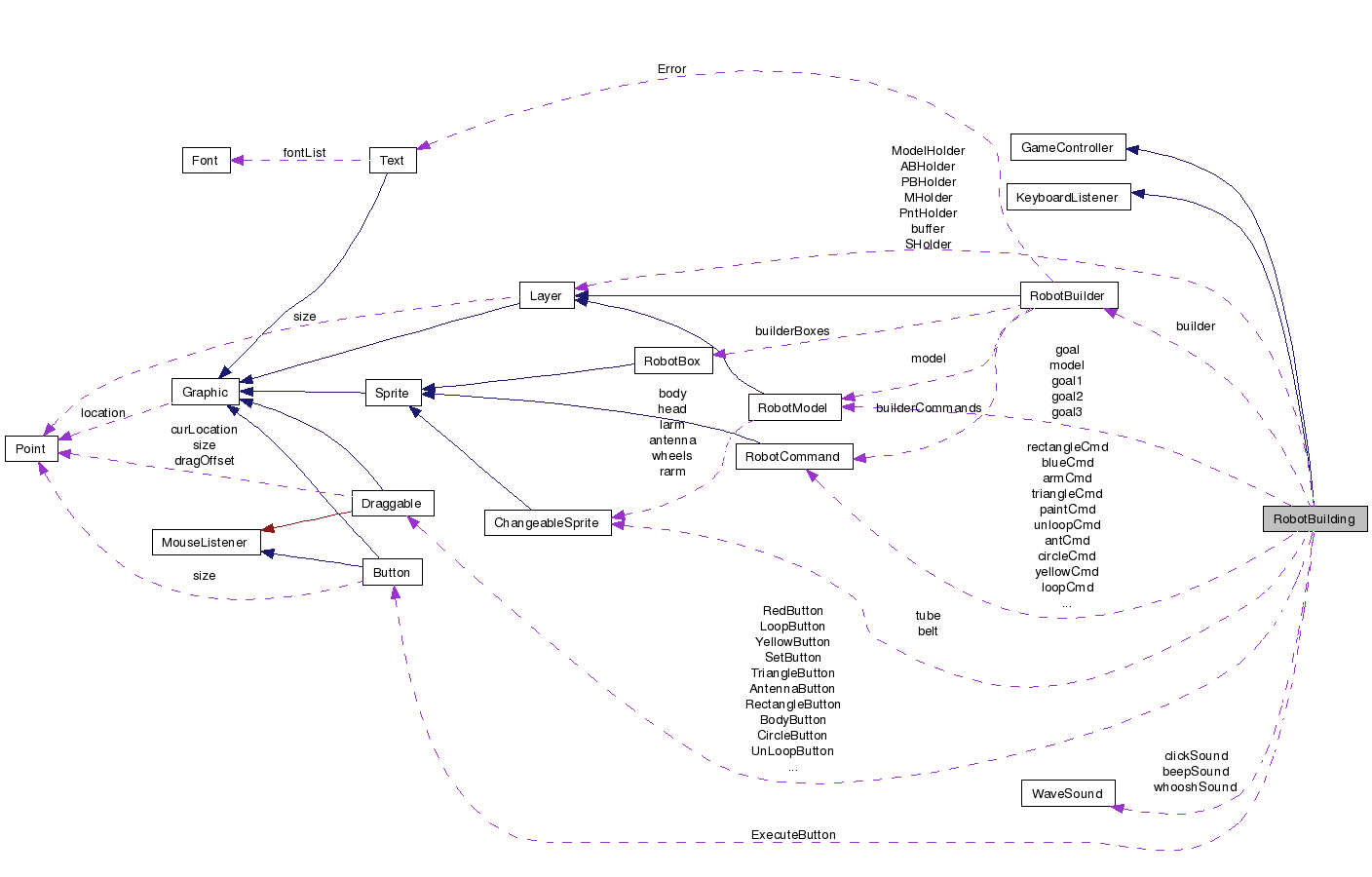
Detailed Description
This is the class which does the bulk of the work. It is a GameController which holds all the buttons and layers that are seen in the game.Constructor & Destructor Documentation
| RobotBuilding::RobotBuilding | ( | int | level, | |
| RobotModel * | Goal1, | |||
| RobotModel * | Goal2, | |||
| RobotModel * | Goal3 | |||
| ) |
| RobotBuilding::~RobotBuilding | ( | ) |
Member Function Documentation
| void RobotBuilding::animate | ( | ) |
| void RobotBuilding::compareModel | ( | ) |
| void RobotBuilding::createHolders | ( | int | lev | ) |
| int RobotBuilding::determineBox | ( | int | row, | |
| int | col | |||
| ) |
| void RobotBuilding::draw | ( | BITMAP * | ) | [virtual] |
This function will also be called each screen refresh to draw to the buffer.
Implements GameController.
| bool RobotBuilding::isComplete | ( | ) | [virtual] |
| void RobotBuilding::outputModel | ( | ) |
Compare the model to the goal.
| void RobotBuilding::performExecute | ( | ) |
| void RobotBuilding::processKeyboardEvent | ( | KeyboardEvent * | e | ) | [virtual] |
Implements KeyboardListener.
| void RobotBuilding::resetBuilder | ( | ) |
| void RobotBuilding::setupBuilders | ( | int | lev | ) |
Outputs the model that is built.
| void RobotBuilding::step | ( | ) | [virtual] |
| void RobotBuilding::updateBelt | ( | bool | forwards | ) |
| void RobotBuilding::updateBox | ( | int | row, | |
| int | col | |||
| ) |
| void RobotBuilding::updateCommand | ( | int | row, | |
| int | col | |||
| ) |
Member Data Documentation
Layer * RobotBuilding::ABHolder [private] |
RobotCommand * RobotBuilding::antCmd [private] |
Draggable * RobotBuilding::AntennaButton [private] |
Draggable * RobotBuilding::ArmButton [private] |
RobotCommand * RobotBuilding::armCmd [private] |
WaveSound* RobotBuilding::beepSound [private] |
ChangeableSprite* RobotBuilding::belt [private] |
Draggable * RobotBuilding::BlueButton [private] |
RobotCommand * RobotBuilding::blueCmd [private] |
Draggable * RobotBuilding::BodyButton [private] |
RobotCommand * RobotBuilding::bodyCmd [private] |
Layer* RobotBuilding::buffer [private] |
RobotBuilder* RobotBuilding::builder [private] |
The robot building machine.
Draggable * RobotBuilding::CircleButton [private] |
RobotCommand * RobotBuilding::circleCmd [private] |
WaveSound * RobotBuilding::clickSound [private] |
bool RobotBuilding::complete [private] |
bool RobotBuilding::congrats [private] |
RobotCommand * RobotBuilding::current [private] |
int RobotBuilding::curValue [private] |
Button* RobotBuilding::ExecuteButton [private] |
The execute buttom. It builds the robot when clicked.
int RobotBuilding::gameLevel [private] |
RobotModel * RobotBuilding::goal [private] |
The various goal robots.
RobotModel* RobotBuilding::goal1 [private] |
RobotModel * RobotBuilding::goal2 [private] |
RobotModel * RobotBuilding::goal3 [private] |
Draggable * RobotBuilding::GreenButton [private] |
RobotCommand * RobotBuilding::greenCmd [private] |
Draggable * RobotBuilding::HeadButton [private] |
RobotCommand * RobotBuilding::headCmd [private] |
bool RobotBuilding::isMoving [private] |
Draggable * RobotBuilding::LoopButton [private] |
RobotCommand * RobotBuilding::loopCmd [private] |
Draggable * RobotBuilding::MetalButton [private] |
The buttons with the various commands that the used can click on.
RobotCommand * RobotBuilding::metalCmd [private] |
Layer * RobotBuilding::MHolder [private] |
RobotModel* RobotBuilding::model [private] |
The model of the robot being build.
Layer * RobotBuilding::ModelHolder [private] |
Graphics layers used.
bool RobotBuilding::noerror [private] |
int RobotBuilding::numDone [private] |
Number of robots completed correctly so far.
Draggable * RobotBuilding::PaintButton [private] |
RobotCommand * RobotBuilding::paintCmd [private] |
Layer * RobotBuilding::PBHolder [private] |
Layer * RobotBuilding::PntHolder [private] |
Draggable * RobotBuilding::RectangleButton [private] |
RobotCommand * RobotBuilding::rectangleCmd [private] |
Draggable * RobotBuilding::RedButton [private] |
RobotCommand * RobotBuilding::redCmd [private] |
Draggable* RobotBuilding::SetButton [private] |
RobotCommand* RobotBuilding::setCmd [private] |
Layer * RobotBuilding::SHolder [private] |
int RobotBuilding::stepNum [private] |
Draggable * RobotBuilding::TriangleButton [private] |
RobotCommand * RobotBuilding::triangleCmd [private] |
ChangeableSprite * RobotBuilding::tube [private] |
Draggable * RobotBuilding::UnLoopButton [private] |
RobotCommand * RobotBuilding::unloopCmd [private] |
WaveSound * RobotBuilding::whooshSound [private] |
Draggable * RobotBuilding::YellowButton [private] |
RobotCommand * RobotBuilding::yellowCmd [private] |
The documentation for this class was generated from the following files:
- Comps/LearningGaming/RobotBuildingMinigame/RobotBuilding.h
- Comps/LearningGaming/RobotBuildingMinigame/RobotBuilding.cpp