Getting started with Compiler Explorer
Background
What does a compiler do?
That question has a long, complicated answer. But in brief, our compiler (gcc)
takes C source files as input, and produces an executable program as output.
The executable program contains, among other things, machine language
instructions can physically guide the CPU to perform the computations we articulated
in our original C code.
Machine language is just bits, like anything else in the computer, but it's
hard to read. So if we want to understand the
correspondence between C code and its corresponding machine language,
we're better off asking gcc to output assembly language code instead. Assembly isn't
particularly easy to read either, but it's a lot easier than machine language.
As a general rule, each assembly language instruction corresponds to exactly
one machine language instruction, and vice versa.
There are some exceptions (e.g., sometimes one assembly language instruction
is an alias for a sequence of two or three machine language instructions),
but as a rough guide, you can think of assembly and machine language instructions
as being in one-to-one correspondence. As a result, by understanding the
assembly language generated by gcc, we will be very close to understanding the
machine language as well.
Compiler Explorer
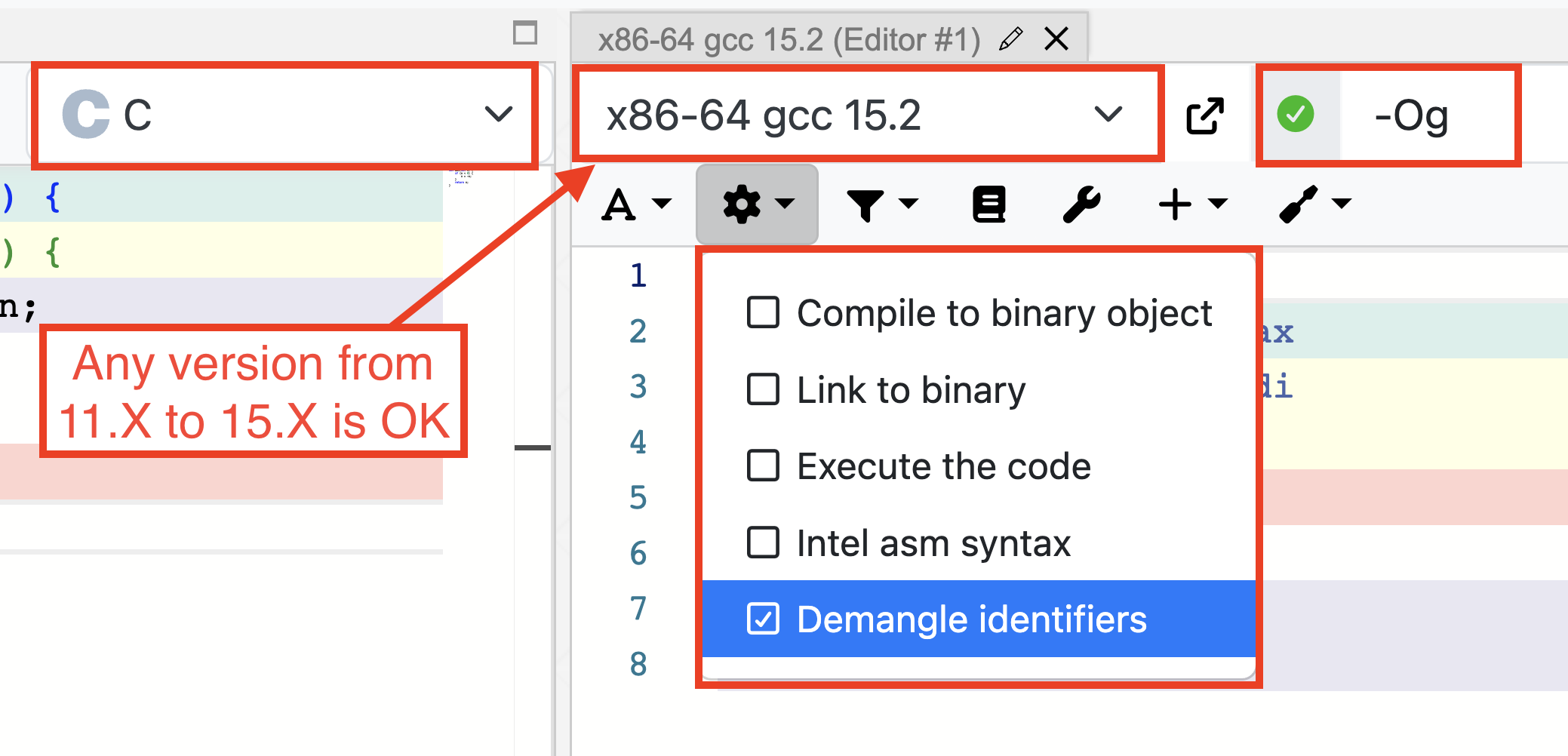
To help us study assembly code, we will use an extremely handy tool called Compiler Explorer. You'll put some C code into the input panel, and the output panel will show you the assembly language generated by the selected compiler. As you adjust your C code, you'll be able to watch the changes in the assembly language, and then compare your assembly code to the puzzle's code.
ESSENTIAL: Set it up like this